Production RAG Chatbots: 6 Architecture Components for Engineers
Production RAG Chatbots: 6 Architecture Components for Engineers
Retrieval-Augmented Generation lets a chatbot answer from your organization’s own documents at query time instead of relying only on what the model memorized during training. Pick RAG when answers need to be current, traceable back to a source, and auditable by a compliance team. Start with a narrow, well-owned domain (one knowledge base, one team) before expanding, and expect to pair it with light fine-tuning once you see where the model’s tone or formatting still misses.
TL;DR:
- Keeping source documents up-to-date and owning content ownership is critical to prevent answers from becoming stale or inaccurate over time.
- Implementing effective retrieval strategies, including semantic and exact-match techniques, reduces retrieval misses and conflicting sources that cause incorrect answers.
- Integrating security controls like access tags and permissions at retrieval time is essential to prevent unauthorized content exposure and safeguard sensitive data.
- Conducting regular adversarial testing and monitoring retrieval latency, answer citation accuracy, and cache hit rates ensures system reliability in production environments.
- Starting with a focused domain and combining retrieval with light fine-tuning offers the most flexible and cost-effective approach for enterprise-level RAG chatbot deployment.
Table of Contents
- What Is RAG for Chatbots, and Why Do Enterprises Use It?
- Core Architecture: Components of a Production RAG Chatbot
- RAG vs Fine-Tuning: A Decision Checklist for Engineers
- How to Build a RAG Chatbot: A Step-by-Step Engineering Checklist
- Production Concerns: Security, Permissions, and Monitoring
- Enterprise Use Cases and Pilot Metrics Where RAG Delivers ROI
- Why Most RAG Chatbot Projects Underestimate the Maintenance Curve
- How Botiqueai Helps You Build and Run a Production RAG Chatbot
- Sources
What Is RAG for Chatbots, and Why Do Enterprises Use It?
RAG works by converting a user’s question into a vector, searching a document index for the closest matching passages, and handing those passages to a large language model along with the original question. The model then writes an answer grounded in that retrieved text, rather than pulling only from its training data. The mechanism is simple; the payoff is what makes it the default enterprise architecture for chatbots that need to reflect a company’s actual policies, products, or case history.
Three benefits explain the adoption curve. First, currency: update the source documents and the chatbot’s knowledge changes within minutes, no retraining required. Second, traceability: because the model cites the retrieved passage, a support agent or auditor can check exactly where an answer came from. Third, fewer hallucinations, though this point deserves precision. Cloudflare’s technical explainer notes that RAG reduces but does not eliminate fabrication. A model can still misread a retrieved passage or blend two documents into an answer that sounds confident and is wrong.
The common failure modes cluster around retrieval, not generation:
- Retrieval miss: the right document exists but the query embedding never surfaces it, so the model answers from thin air.
- Conflicting sources: two documents disagree (an old policy PDF and a new wiki page), and the model can’t tell which one is authoritative.
- Chunk fragmentation: a passage gets cut mid-sentence, losing the context that made it correct.
- Stale index: source documents changed, but nobody re-ran the embedding pipeline.
Most of what looks like “the AI got it wrong” in production RAG systems is actually a retrieval problem wearing a generation costume.
Core Architecture: Components of a Production RAG Chatbot
A production RAG chatbot is a pipeline, not a single model call. Six components do the real work, and each one has failure modes an engineering team needs to plan for before launch.
- Data ingestion and chunking. Pull documents from wikis, CRMs, PDFs, and ticketing systems, then split them into passages small enough to embed precisely but large enough to keep context intact. Semantic-aware chunking, where boundaries follow headings or paragraph breaks rather than a fixed token count, tends to improve passage-level precision over blind token windows, especially when you tag each chunk with metadata like source, date, and access level.
- Embeddings. A model converts each chunk (and later, each query) into a vector. The choice here matters less than people assume; consistency between the embedding model used for indexing and the one used at query time matters far more than picking the “best” model on a leaderboard.
- Vector index. Vector databases like FAISS, Chroma, or OpenSearch’s vector plugin store those embeddings for fast similarity search. At small scale, any of them work. At enterprise scale (millions of chunks, sub-second latency requirements), sharding and index type (HNSW vs flat) start to determine your infrastructure bill.
- Retriever and reranking. Dense retrievers like DPR find semantically similar passages; sparse methods like BM25 catch exact keyword and ID matches that dense retrieval often misses. A hybrid of the two typically reduces both false negatives on exact identifiers and semantic misses on paraphrased questions. A reranking step, run after initial retrieval, reorders the top candidates by relevance before they reach the prompt.
- Prompt assembly. The system stitches the user’s question, the retrieved passages, and instructions (tone, citation format, refusal rules) into a single prompt. This is where “retrieval fusion” patterns live, deciding how many chunks to include and in what order.
- Generator and adapters. The LLM (a GPT-family, Llama-family, or Gemini model) produces the answer. LoRA adapters can be layered on top to teach the model domain-specific tone or formatting without full retraining, and pairing LoRA with RAG lets teams add domain behavior while keeping the knowledge base updatable through the index rather than through weights.
Pro Tip: Log every retrieved chunk alongside the final answer during your pilot. When something goes wrong, you’ll want to know instantly whether retrieval failed or the model misread a passage that was actually correct.
Botiqueai’s Agentic RAG deployment for Acolad is a working example of these six pieces assembled for a real production workload rather than a demo.
RAG vs Fine-Tuning: A Decision Checklist for Engineers
The RAG-versus-fine-tuning debate gets treated as a binary choice more often than it should. In practice, the two solve different problems, and the strongest enterprise deployments usually blend them.
RAG wins on update speed. Change a document, and the chatbot’s answer changes on the next query, with no retraining cycle. Fine-tuning wins on consistency of behavior and output format, teaching a model to always respond in a particular structure or voice regardless of what gets retrieved. AWS’s own prescriptive guidance frames it this way: RAG for document-grounded Q&A and fast-changing content, fine-tuning for stable domain behavior, and a hybrid approach for most serious enterprise use cases.
Cost tells a similar story. RAG’s operational cost lives in retrieval infrastructure (the vector database, embedding pipeline, and reranking latency), which is cheaper to iterate on than a training run but adds per-query overhead. Fine-tuning shifts cost upfront into data labeling and GPU training time, then keeps inference lean since there’s no retrieval step. Databricks’ engineering guidance recommends starting with RAG specifically because it needs no labeled training set and delivers visible results faster, using early query telemetry to decide later whether fine-tuning is worth the investment.
The evidence for combining both is concrete. One experiment on a domain-specific dataset found fine-tuning alone added roughly 6 percentage points of accuracy, RAG alone added roughly 5 points, and the combined pipeline produced cumulative gains beyond either technique alone.
Before choosing, answer these questions as a team:
- How often does the underlying knowledge change: daily, quarterly, or almost never?
- Does compliance require you to cite the exact source behind every answer?
- Do you have labeled examples of ideal responses, or only raw documents?
- Can your infrastructure tolerate the added latency of a retrieval step at peak load?
If the answers point to fast-changing, citable content with no labeled dataset, start with RAG. If they point to stable behavior and you already have thousands of example interactions, fine-tuning earns its cost. Most enterprise teams land somewhere in between within two quarters.
How to Build a RAG Chatbot: A Step-by-Step Engineering Checklist
Building a production RAG chatbot is a sequence, and skipping steps is what turns a promising pilot into a support ticket generator. Here’s the order that actually works.
- Scope the domain and name an owner. Pick one knowledge domain (billing FAQs, HR policy, product documentation) and assign a human owner responsible for keeping the source content accurate. List every canonical source: wikis, PDFs, ticketing exports, CRM notes.
- Ingest, normalize, and chunk. Pull content into a consistent format, strip boilerplate (headers, footers, navigation text), and chunk with semantic boundaries. Attach metadata to every chunk: source document, last updated date, and access-control tags.
- Embed and index. Run chunks through your embedding model and load vectors into your chosen store (FAISS, Chroma, OpenSearch, or a managed equivalent). Decide your retrieval strategy now: dense-only for pure semantic search, hybrid if your content includes IDs, SKUs, or exact terminology.
- Add reranking and prompt assembly. Retrieve a wider candidate set (say twenty chunks), rerank down to the three or four most relevant, and assemble a prompt that includes citation instructions so the model states which source it used.
- Test adversarially before rollout. Feed the system deliberately ambiguous, out-of-scope, and conflicting-source questions. Run a canary rollout to a small internal group before opening it to the full team or customer base.
- Establish the index update process. Decide who re-runs the embedding pipeline when source documents change, and how often, before day one, not after the first stale answer complaint.
Open-source scaffolding like the ragchatbot Python package can compress steps two through four into a working local prototype in an afternoon, useful for validating the concept before committing engineering time to a full build. Botpress’s own implementation walkthrough follows a nearly identical sequence: project setup, source connections, indexing, identity customization, then deployment.
Pro Tip: Run your adversarial test set through the pipeline every time you update the knowledge base, not just at launch. A new document can silently break retrieval for questions that worked perfectly the week before.
For teams scaling past a single pilot, Botiqueai’s infrastructure and rollout guide walks through the architecture decisions that separate a working demo from something IT will actually approve for production.
Production Concerns: Security, Permissions, and Monitoring
A RAG chatbot that works in a demo and one that survives an enterprise security review are different projects. The gap is almost entirely about governance, not model quality.
Access control has to happen at retrieval time, not after the answer is generated. Tag every chunk with the permission group that can see it, then filter the retriever’s candidate set by the requesting user’s role before any passage reaches the prompt. Skip this step and you get a chatbot that cheerfully surfaces a document an intern shouldn’t see.
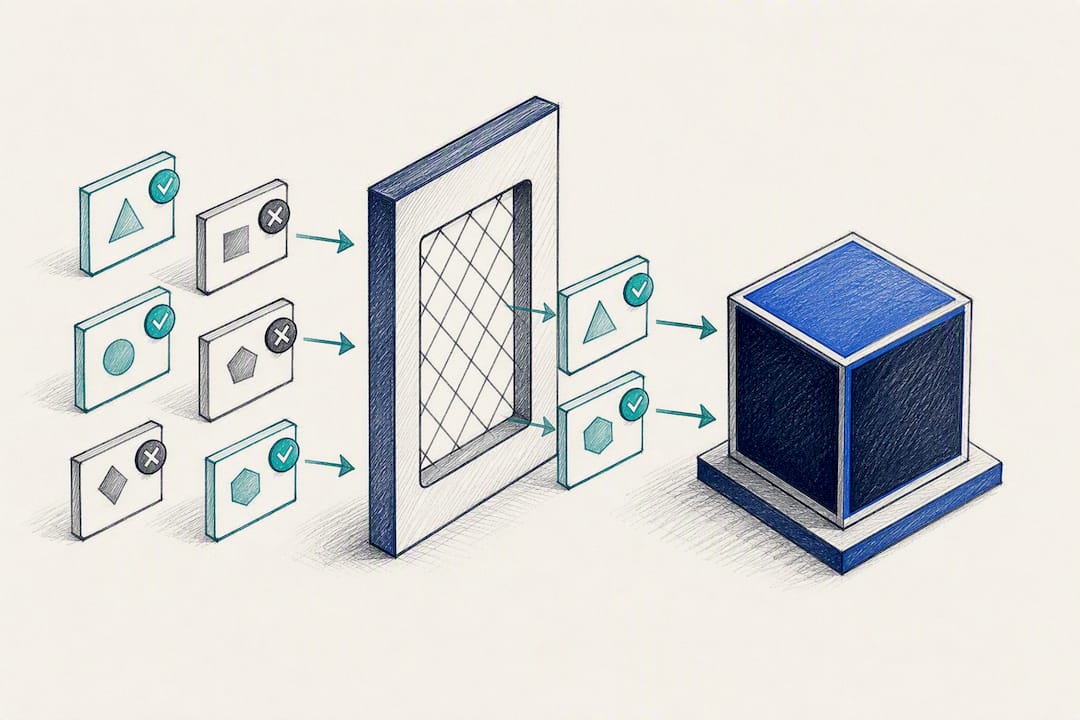
PII handling needs its own policy. Decide what gets redacted before indexing (names, account numbers, medical details) versus what gets retained with access restrictions, and set a retention schedule so old, sensitive chunks don’t linger in the vector store indefinitely.
Prompt injection is the threat model most teams underestimate. A malicious or careless user can embed instructions inside a document that later gets retrieved and fed to the model, hijacking its behavior. Security-focused writeups on RAG deployments recommend logging every retrieved source alongside the generated answer and running runtime checks that flag when retrieved content contains instruction-like language.
Watch these operationally:
- Retrieval latency at the 95th percentile, not just the average, since tail latency is what users notice.
- Cache hit rate on repeated or similar queries, since caching common retrievals cuts both cost and latency.
- Answer-to-citation match rate, flagging responses where the model’s claim doesn’t actually appear in the cited chunk.
- Query volume by access-denied filter, which surfaces permission gaps before a user complaint does.
Response time budgets tend to break in the same place: teams underestimate how much latency reranking adds on top of the initial vector search, and only catch it once real query volume hits the system.
Enterprise Use Cases and Pilot Metrics Where RAG Delivers ROI
Not every team benefits equally from a RAG chatbot, and picking the wrong first pilot is the most common reason enterprise AI initiatives lose funding after quarter one.
Customer support knowledge bases are the most common starting point, and for good reason: the source content already exists (help center articles, past tickets), and success is easy to measure through deflection rate and average resolution time. IT and HR self-service follow closely behind, with the added wrinkle that role-based access control matters immediately since HR content often includes salary bands or personal case details that shouldn’t surface to every employee. Legal and research assistants demand the strictest citation discipline of all three, since an uncited or misattributed answer in a legal context isn’t just embarrassing, it’s a liability.
Reasonable pilot KPIs to track over a 60 to 90 day window:
- Query deflection rate: the percentage of questions the chatbot resolves without human escalation.
- Citation accuracy: how often the cited source actually contains the claimed information.
- Time-to-resolution compared against the pre-chatbot baseline.
- User satisfaction on flagged low-confidence answers, since low-confidence handling often matters more than raw accuracy.
A pilot that hits strong deflection numbers but weak citation accuracy is telling you the retrieval layer needs work before you scale it, not that the whole approach failed.
Why Most RAG Chatbot Projects Underestimate the Maintenance Curve
The conventional pitch around RAG focuses almost entirely on the build. Botiqueai’s view, shaped by running these deployments end to end, is that the build is the easy half. The knowledge base decays the moment it ships, and most teams don’t budget for that.
A RAG chatbot is only as current as its weakest source document. We’ve seen pilots stall not because the architecture was wrong, but because nobody owned the wiki page the retriever kept surfacing after it went stale. That’s not a model problem. It’s an organizational one, and it’s the reason we push clients to name a content owner before writing a line of retrieval code, not after launch.
The other underestimated piece is evaluation discipline. Teams love measuring deflection rate because it’s easy to report upward. Far fewer teams measure citation accuracy with the same rigor, and that’s the metric that predicts whether legal or compliance will actually trust the system six months in. A chatbot that answers fast and cites wrong is worse than one that answers slow and cites correctly, because the first one erodes trust quietly until someone catches a bad answer in front of a customer.
Hybrid architectures, RAG for the fast-moving knowledge, light fine-tuning for tone and format consistency, aren’t a compromise. They’re usually the mature end state every serious deployment eventually reaches.
— Botiqueai
How Botiqueai Helps You Build and Run a Production RAG Chatbot
If reading through six architecture components and a governance checklist made the scope of a real RAG deployment clear, that’s the point where most internal teams decide whether to build alone or bring in engineering help. Botiqueai runs both paths: custom RAG and agent builds for teams with specific integration needs, and Aria, a ready-to-deploy AI chatbot for websites and e-commerce, for teams that want a grounded, citable assistant live without a multi-month build cycle.
Contact Botiqueai when you’re past the whiteboard stage and ready for a pilot, a proof of concept against your own documents, or a full production rollout with permissioned retrieval and monitoring built in from day one. A first engagement typically starts with scoping your data sources and access requirements, then moves into a working prototype you can test against real questions within weeks, not quarters. If your rollout also touches internal workflows, Botiqueai’s automation services connect the chatbot layer to the systems your team already runs on. Reach out through the Aria product page to scope your first pilot.
Sources
- Comparing Retrieval Augmented Generation and fine-tuning (AWS)
- RAG vs Fine Tuning: Enterprise Decisions for AI Models and AI Systems | Databricks Blog
- How to build a RAG chatbot (Botpress blog)